Sunday, June 22, 2008

Processing soap envelope within BizTalk Server

BizTalk parsing engine supports envelope schemas. This means that if the incoming message is marked as envelope schema, the parsing engine will parse the message and will dispatch the body content of the envelope as the message body part.

The most common scenario is when BizTalk receives SOAP Envelop. It's little known that Microsoft supplies soap envelope XSD schema as part of BizTalk system schemas. The schema name is BTS.soap_envelope_1__1 and is deployed inside Microsoft.BizTalk.GlobalPropertySchemas.dll under BizTalk.System BTS application.

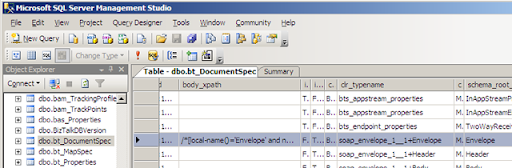
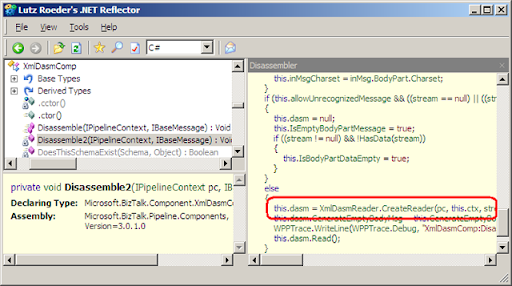
When schema is marked as Envelope (is_envelope="yes"), the engine is looking for the body_xpath annotation. This value is the actual data section and will be assigned as the message part. The value of body_xpath attribute is saved in dbo.bt_DocumentSpec table of BizTalkMgmtDb database. In the disassembling process the engine is extracting the value by using IDocumentSpec.GetBodyPath() under Microsoft.BizTalk.Component.Interop namespace.

Then the engine performing denormalize process by extracting message data from the body element. At the end of the process, BTS.MessageType context property is set to the message type of actual content of the soap:Body section.

How do I start an Orchestration with soap:envelope message type

Normally, Orchestration subscription includes value for BTS.MessageType context property, this mean you can't start orchestration with the soap envelope message type because the XmlDisassembler Component will discard the soap:Envelope content and the messaging engine will only get the soap:Body content – so at the end of the process, BTS.MessageType context property will be set to the actual message type of content under soap:Body section and the orchestration will never start with the type soap:Envelope.

In case you need to process the entire soap:Envelope inside orchestration:

  • Use PassThruReceive pipeline.
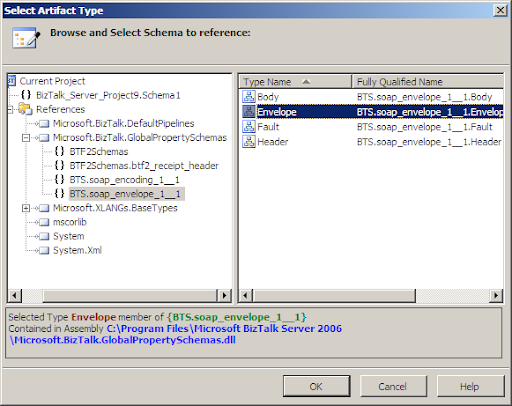
  • Define message of type BTS.soap_envelope_1__1 message inside the orchestration (Message Type > schemas > from referenced assembly > Microsoft.BizTalk.GlobalPropertySchemas).
  • Use Xml Document as the incoming message.
  • Assign the incoming Xml Document message to the BTS.soap_envelope_1__1 message.

Which custom pipeline component I need to develop for extracting the soap:Body section

If you need to receive message that is wrapped by a soap envelope and you're using the XmlDisassembler pipeline component - there's no need to develop further components for extracting the body element because the engine will automatically dispatch the soap:Body as the message part.

What about soap:Header and soap:Fault section

The automatic dispatch is only for the soap:Body section and the other section are discarded. so if you also need to process the soap:Header section you have to write a custom pipeline component for this task.

Saturday, June 21, 2008

Dependency in BizTalk Assembly

When you deploy BizTalk assembly you must ensure that any referenced assembly is also deployed. Actually, BizTalk is enforcing that by not letting you applying adding resource action without deploying all its references.

When removing resource BizTalk doesn't uninstalling the actual assembly from the GAC, so, any application would work regardless to missing registration of the assembly in BizTalk database.

On the other hand, BizTalk is forcing dependencies when trying to delete (or modify) any resource that has other depended artifact in BizTalk. This means that if one application uses pipeline component or map from referenced BizTalk Application, BizTalk explorer object model (Microsoft.BizTalk.ExplorerOM) will throw an exception when trying to remove the assembly containing the pipeline component or map as long you'll not reset the pipeline to the default passthrough pipeline components (or some pipeline from other deployed assembly) and remove the mapping from the port.

The very same behavior is happens when it come to BizTalk resources. Any attempt to remove assembly that referenced by other assembly inside any BizTalk application will throw exception by BizTalk ApplicationDeployment API's. (Microsoft.BizTalk.ApplicationDeployment)

How does BizTalk detects references assemblies

BizTalk is actually uses System.Reflection to detect references. Each System.Reflection.Assembly object has References member of type List that contains the fully-qualified name. Inside BizTalk any resource has Resource.Luid property, when deleting (or modifying) assembly ApplicationDeployment API's loads each resource as an System.Reflection.Assembly object and checks the References member for this Luid. If BizTalk finds equal Luid an exception will be thrown.

Because of this reason, updating infrastructure artifacts is quite headache. The Process must be in the following order:

  • Removing all referenced Applications.
  • Remove infrastructures old version.
  • Deploy infrastructures new version.
  • Deploy all high level referenced Application.

Where can I search for BizTalk assembly for checking its referenced Assemblies

There are three places which BizTalk assembly can be found for checking its referenced assemblies:

  • Local server where the assembly location specified by the sourceLocation property – this approach
  • Remote server where the sourceLocation property specifies assembly on the local machine - this is the most bad option because you must be sure the assembly is the very same as the one on the remote computer. Unfortunately this is the actual way BizTalk Administration Console is using – see below.
  • Local server on the GAC – this is the best option because it checks the actual running assembly.

How can I detect references in BizTalk assemblies

BizTalk 2006 MMC offers GUI for detecting references in BizTalk assemblies. Despite this, the MMC is running in a client mode, on a remote computer so, the GUI is not checking the remote machine GAC. As I wrote, this checking is Reflection based so; the BizTalk MMC must load the assembly into memory before being able to search for Luid equality – which is not possible from remote computer.

The way BizTalk MMC handles this issue is by using the property annotations list that each BizTalk resource contains:

Each Resource has Resource.Properties property of IDictionary<string,Object> type. the entry in this dictionary which points to the resource path is 'SourceLocation' so, BizTalk Administration console uses this entity for the parameters needed by System.Reflection.Assembly.Load method. By this, if the local machine contains the assembly on the same path as in the remote computer – BizTalk Administration console can load it into memory and search for references.
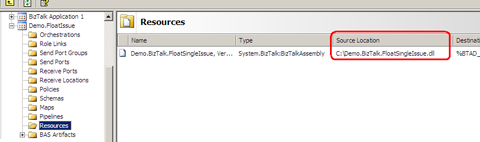
  

In the following, BizTalk administration console MMC was find the assembly in the path specified under the sourceLocation, so check for dependencies was preformed.
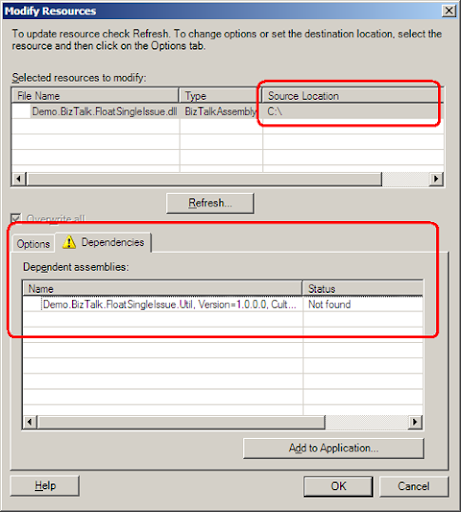
 

If the Administration Console can't find the assembly in the location specified in sourceLocation – the System.Reflection.Assembly.Load method failed and no further check is preformed.
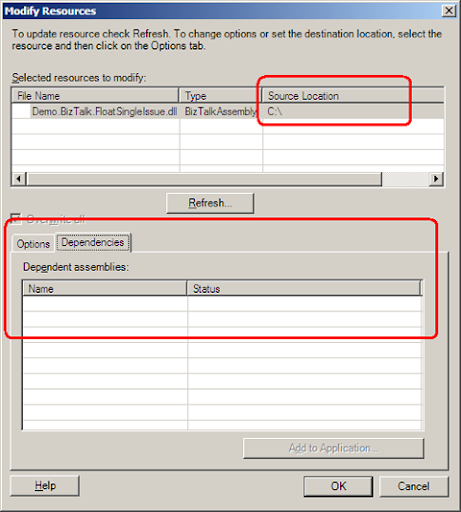
In this insight, it would be much more advisable to run the check on the local server GAC. Unfortunately, BizTalk 2006 administration console is MMC snap-in and was designed to run on a remote computer so it does not support this approach.

The first step for extracting BizTalk Assembly from the GAC is by finding the path to the assmebly. this can be done by using the  GetAssemblyPath(string assemblyDisplayName) static method of the GAC class under Microsoft.BizTalk.Gac namespace. you can find this namespace in Microsoft.BizTalk.Deployment.dll

The second step is to load the assembly. this can be done by using Microsoft.BizTalk.Deployment.Assembly namespace. use AssemblyBase property of the BtsAssemblyManager class.

Here's the code snippet:

public List<string> CheckDependencies(string btsAssemblyLuid, string btsSqlServerName)
{
   List<string> dependeciesArr = new List<string>();
 
   string[] btsAssemblyProps = btsAssemblyLuid.Split(',');
   string btsAssemblyName = btsAssemblyProps[0];
   string btsAssemblyVersion = btsAssemblyProps[1].Remove(1, "Version=".Length).Trim();
   string btsAssemblyCulture = btsAssemblyProps[2].Remove(1, "Culture=".Length).Trim();
   string btsAssemblyKey = btsAssemblyProps[3].Remove(1, "PublicKeyToken=".Length).Trim();
 
  string btsAssemblyPath = Microsoft.BizTalk.Gac.Gac.GetAssemblyPath(btsAssemblyName);
  Microsoft.BizTalk.Deployment.Assembly.BtsAssemblyManager mgr = new Microsoft.BizTalk.Deployment.Assembly.BtsAssemblyManager(btsAssemblyPath, null);
 
  Microsoft.BizTalk.MetaDataOM.IAssemblyBase assembly = mgr.AssemblyBase;
 
   Microsoft.BizTalk.ApplicationDeployment.Group group = new Microsoft.BizTalk.ApplicationDeployment.Group();
   group.DBName = "BizTalkMgmtDb";
   group.DBServer = btsSqlServerName;
 
   foreach (Microsoft.BizTalk.ApplicationDeployment.Application app in group.Applications)
   {
       foreach (Microsoft.BizTalk.ApplicationDeployment.Resource res in app.ResourceCollection)
       {
           if (res.ResourceType.Equals("System.BizTalk:BizTalkAssembly") || res.ResourceType.Equals("System.BizTalk:Assembly"))
           {
               string[] props = res.Luid.Split(',');
               string name = props[0];
               string version = props[1].Remove(1, "Version=".Length).Trim();
               string culture = props[2].Remove(1, "Culture=".Length).Trim();
               string key = props[3].Remove(1, "PublicKeyToken=".Length).Trim();
 
               string path = Microsoft.BizTalk.Gac.Gac.GetAssemblyPath(name);
               Microsoft.BizTalk.Deployment.Assembly.BtsAssemblyManager manager = new Microsoft.BizTalk.Deployment.Assembly.BtsAssemblyManager(path, null);
               Array references = manager.AssemblyBase.References as Array;
 
               foreach (string refName in references)
               {
                   if (assembly.DisplayName.Equals(refName))
                   {
                       dependeciesArr.Add(app.Name + " : " + res.Luid);
                   }
               }
           }
       }
   }
 
   return dependeciesArr;
}
 

Friday, May 30, 2008

Microsoft ESB Guidance - Message flow : Part I

The ESB Guidance are set of tools that extends BizTalk from regular EAI 'Hub-and-Spoke' Broker, into the 'SOA' world. One of the first thing you need to know about the guidance is that there's (almost) no magic or new stand alone feature in there - the guidance takes you beyond 'EAI' by understanding BizTalk 2006 architecture and leading BizTalk features to the wanted results.

The main components are:

  • Itinerary On/Off ramps - Extends BizTalk Messaging and BizTalk Adapter framework.
  • Core services (Agents) - Extends BizTalk Orchestration.
  • Exception management - Extends BizTalk Error report (For Orchestrations) and ACK/NACK notification (For pipelines)
  • Web services - Extends BizTalk transformation API and ExplorerOM API

In the following, slides from the session I gave together with Daniel Ben Zikry at 'SOA open day' ,Microsoft - Israel.

BizTalk Server 2006 was designed to fully encapsulate the End-Point native technology and the broker Routing engine. this was done by separating the Messaging engine from the Adapter layer and the EPM. in this strategy, the communication with the End-Point and the translation of the incoming bytes into something BizTalk can handle with - is under the responsibility of the adapter and the Message engine is route the message to the destination without worry about protocols ,specifications or programing languages.

Unfortunately all the above is not so simple, BizTalk Routing Engine is working in pub/sub pattern and the topics are Promoted Properties. the broker has no idea what to do with the incoming stream unless it came with instructions as metadata. the instructions are the Topic that all subscribers are listening to. in BizTalk routing engine, the Topic is a key/value entry in the message context that signed as "propPromoted" - a promoted property.

The component in the layer that promote those properties is the Adapter - and each adapter promote it's own properties. so you can't really be sure the message that submitted through SOAP adapter is routed in the very same way as a message submitted by MQSeries adapter - unless the routing is defined by a common promoted property. this architecture leads to tight coupling between service provider and client endpoint technology. In 'SOA' term, the service is an atomic unit of functionality that has no limit to the client protocol, this problem traditionally handled by a Logical Port that contains physical port. each physical port has one adapter to work against one endpoint technology. the topic for all subscribers was the logical port. the disadvantage with this solution is that the only way to active and consume the service is through this logical port, which means, not all other messages submitted into the MessageBox from any other logical ports. so, the real solution is to use ESB Routing context property and use them as topics for all subscriptions.

This is exactly what happened within the ESB Guidance. All routing inside the ESB are done by common ESB Routing properties. The layer between the Adapter framework and the Message Engine is the ESB Pipelines. this means that the message is submitted into the adapter and after this the message is moved to the next layer and only then - absolutely isolated from the adapter and the endpoint - the routing properties are initialized.

Sunday, May 18, 2008

xsl:for-each statement with BizTalk mapper

Honestly, I'm not a big fan of the XSL mapper editor shipped with BizTalk extensions for VS2005. likewise with the xsl and C# functions visual representation called functoids. Personally, I find writing the XSL code to transform between one XML to another as easy approach and more easy tuning then fighting with the editor until it generates the appropriate code.

One common scenario is generating xsl:for-each loop in the XSL stylesheet. I stopped counting the times people asked me how to to obtain this with the mapper. The task is easy when you write the xsl code by yourself but much more complicated when you're trying to generate it with the mapper.

  • unbounded element to another unbounded element.

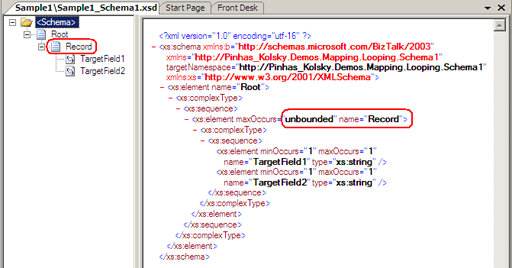
The basic scenario is transforming from one repeating element to another. consider the following:

Source Schema:


Destination Schema:

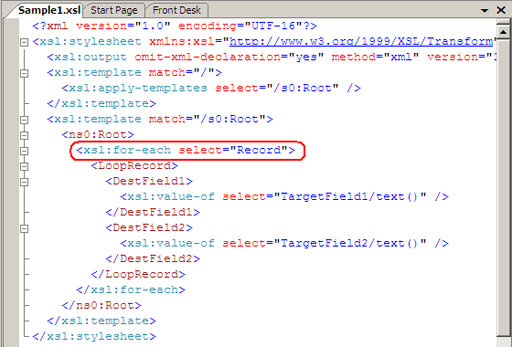
XSL Code:

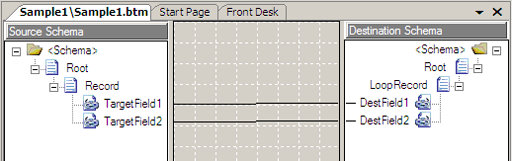
BizTalk Mapper:

As you can see, to create the above XSL, all you have to do is to drug the source elements to the destination. this is because both source and destination elements are unbounded, so the mapper 'understand' and generating xsl:for-each statement.

  • Unbounded element with maxOccurs="1" child and unbounded child:

consider the following:

Source Schema:

Destination Schema:

Input XML:

<ns0:Root xmlns:ns0="http://Pinhas_Kolsky.Demos.Mapping.Looping.Schema1">

  <Record1>

    <Record>

      <Record2>

        <TargetField1>1</TargetField1>

        <TargetField1>2</TargetField1>

      </Record2>

      <Record2>

        <TargetField1>3</TargetField1>

        <TargetField1>4</TargetField1>

      </Record2>

    </Record>

  </Record1>

  <Record1>

    <Record>

      <Record2>

        <TargetField1>5</TargetField1>

        <TargetField1>6</TargetField1>

      </Record2>

    </Record>

  </Record1>

</ns0:Root>

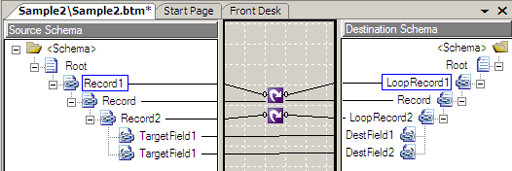
in this case, you cannot drug the elements like in the basic scenario:

BizTalk Mapper:


BizTalk mapper can 'guess' how to build the for-each statement only in the basic scenario, in the case above, the mapper will generate the first child of the unbounded destination element more then once:

XSL Code:

Output XML (Not valid):

<ns0:Root xmlns:ns0="http://Pinhas_Kolsky.Demos.Mapping.Looping.Schema2">

  <LoopRecord1>

    <Record>

      <LoopRecord2>

        <DestField1>1</DestField1>

        <DestField2>2</DestField2>

      </LoopRecord2>

      <LoopRecord2>

        <DestField1>3</DestField1>

        <DestField2>4</DestField2>

      </LoopRecord2>

    </Record>

    <Record>

      <LoopRecord2>

        <DestField1>5</DestField1>

        <DestField2>6</DestField2>

      </LoopRecord2>

    </Record>

  </LoopRecord1>

</ns0:Root>

As you can see, the element 'Record' was created twice.

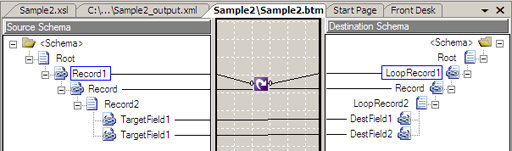
In this case you must use the looping functiod:

BizTalk Mapper:

XSL Code:

Output XML (valid):

<ns0:Root xmlns:ns0="http://Pinhas_Kolsky.Demos.Mapping.Looping.Schema2">

  <LoopRecord1>

    <Record>

      <LoopRecord2>

        <DestField1>1</DestField1>

        <DestField2>2</DestField2>

      </LoopRecord2>

      <LoopRecord2>

        <DestField1>3</DestField1>

        <DestField2>4</DestField2>

      </LoopRecord2>

    </Record>

  </LoopRecord1>

  <LoopRecord1>

    <Record>

      <LoopRecord2>

        <DestField1>5</DestField1>

        <DestField2>6</DestField2>

      </LoopRecord2>

    </Record>

  </LoopRecord1>

</ns0:Root>

It's impotent to notice that when the mapper is not automatically creates the XSL by drugging the elements, you can't use both - looping functiod for the parent and drugging unbounded to unbounded. this will generate only the first xsl:for-each. you can see this in the following:

BizTalk Mapper:


XSL Code:

Output XML (Not valid):

<ns0:Root xmlns:ns0="http://Pinhas_Kolsky.Demos.Mapping.Looping.Schema2">

  <LoopRecord1>

    <Record>

      <LoopRecord2>

        <DestField1>1</DestField1>

        <DestField2>2</DestField2>

      </LoopRecord2>

    </Record>

  </LoopRecord1>

  <LoopRecord1>

    <Record>

      <LoopRecord2>

        <DestField1>5</DestField1>

        <DestField2>6</DestField2>

      </LoopRecord2>

    </Record>

  </LoopRecord1>

</ns0:Root>

Conclusions: generating xsl:for-each statement with BizTalk mapper:

  • In a simple scenario you can generate xsl:for-each by drugging the source unbounded element to the destination unbounded element.
  • When you need to add more logic to the code (like creating maxOccurs="1" element inside the looping) you must use looping functoid.
  • In a case when a looping functoid is necessary, you must use one looping functoid for each unbounded element.  

Thursday, May 1, 2008

BizTalk project namespace and schema-type namespace duplication issue

When adding web reference to a C# project in Visual Studio, VS generates a class named Reference.cs. this class is the C# code of the XSD types of the web service. BizTalk installation includes extensions to visual studio that additionally creates classes for BizTalk artifacts that will be used by the BizTalk messaging engine.

When you create XSD schema - VS will generate cs file with the schema as a CLR object. the naming convention for this file is <schemaName>.xsd.cs 

When you add a Web reference to the project - VS will create three classes:

  1. Reference.map.cs
  2. Reference.odx.cs
  3. Reference.xsd.cs

In a future post I'll write about those classes in great details.

The namespace and the CLR class name of the auto-generated classes is depends on some factors:

For web reference:

  • The class namespace is the project default namespace (by default it's Visual Studio Project filename ) + dot sign (.) +  the name of the web reference.
  • The class name is a factor of the WSDL artifact.

For XSD schema:

  • The class namespace is the schema-type namespace
  • The class name is the schema-type name.

This naming convention is auto-generated and you can't control or change it.

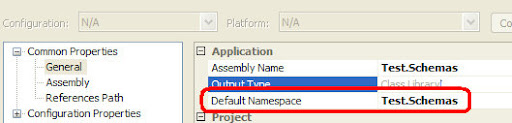
Another thing to know is that for the Compiler perspective, the default namespace for all artifacts in the project is default namespace (by default it's the VS project filename).

All the above leads us to this:

What if the default namespace (the project filename) is equals to the XSD schema-type namespace?

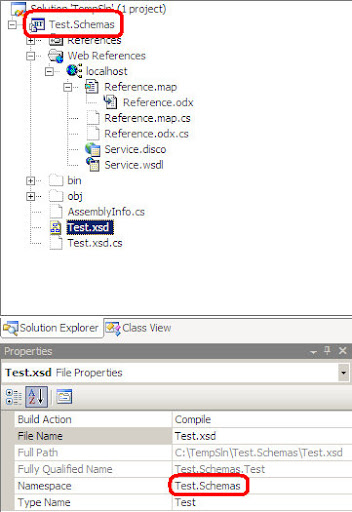
In a regular situation it's all right but in case you adding web reference to the project, VS will generate the namespace for the Reference.odx.cs classes in the form of <ProjName>.<WebRefName> so if the name of the project file is Test.Schemas it will look like: Test.Schemas.<nameOfWebRef>

In the sample below Test.Schemas is a namespace.

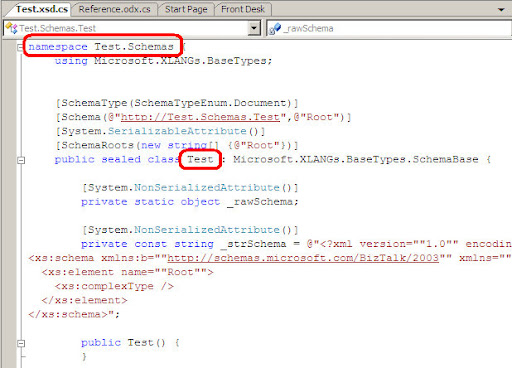
When VS generates the XSD schema class it will generate it in the form of <schemaNS>.<schemaName>

in the sample below Test.Schemas is the class namespace and Teat is the class name; explicit: Test.Schemas.Test

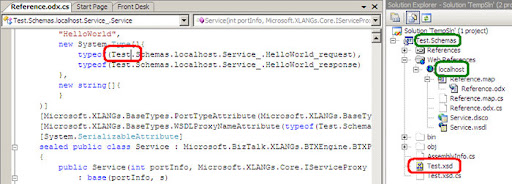
When the compiler tries to compile the project it will translate the word 'Test' in namespace of the web reference file Reference.odx.cs as the class that represents the XSD schema-type, because the schema has the same namespace as the project default namespace – by default the VS project name.


This process will cause the following error:

error CS0426: The type name '<Name>' does not exist in the type.

The error means that the XSD generated class 'Test' does not contains member with the name 'Schemas'. this is completely true because 'Test.Schemas' is only a namespace – copied from the project namespace.

To fix the error, all we have to do is to change the schema name or the schema namespace. additionally, we can change the project default-namespace and then import the web reference.

Be aware that to change the web reference namespace you need to remove them and adding them again.

The insights of all of this: if your project default namespace is composed of two words separated by a dot (.) sign:

  • Unless you have a web reference in your BizTalk project – you can name the schema namespace just like the VS project file including 'dot' sign, you can also name the schema-type name as the first word in the Project filename.
  • If you need to include a web reference in the project change the schema-type namespace to be different from the project namespace. additionally; you can name the schema-type name different from the first word in the project namespace.

Monday, April 28, 2008

BizTalk UTF-8 codepage

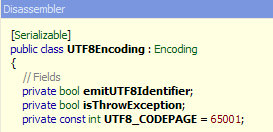
I guess it's only me but after working a lot with BizTalk and WMQ, it was so clear to me that UTF-8 codepage is 1208. so today when working with the SAP adapter against Hebrew records we set value of the BizTalk Code Page as 1208 . the correct value is actually 65001.

I also find this about the SAP Adapter: http://msdn2.microsoft.com/en-us/library/aa562108.aspx

With Service Pack 1 installed, you must specify the appropriate encoding on any new and existing SAP receive port while receiving the IDoc. For example, if you need to receive Japanese characters, you may want to consider setting BizTalk Code Page as 65001, which is UTF-8 encoding.

Finally, look inside the UTF8Encoding class:


So for all of you out there:

  • For IBM products (like WebSphere MQ) UTF-8 codepage is 1208.
  • For widows based products UTF-8 codepage is 65001.

thanks to Amir Cohen for that.

Tuesday, April 1, 2008

Dynamic Send Port - Host instance limitation

In a previous post, I wrote about the importance of choosing the right Host instances for a peacefully working 'real-world' BizTalk solution. Although this is right for all BizTalk artifacts, unfortunately there's one exception: Dynamic Send Ports.

The analogy behind Dynamic ports is a wish to provide BizTalk the flexibility of 'SOA' - a way to create an atomic service that has no intension with the End-Point protocol/technology. the Dynamic ports are the way BizTalk server is combining it's Orchestration engine with the Adapter framework layer. in runtime - the orchestration will inform the adapter engine with the information about the destination Protocol and URI and the adapter engine will ship the message to that location using the right Adapter instance.

This magic become possible thanks to the Microsoft.XLANG.BaseTypes.Address class who derived from PortPropertyBase class under Microsoft.XLANG.BaseTypes.dll.

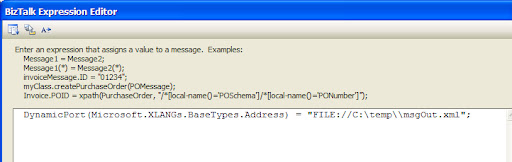
When passing those's parameters to the port, the Adapter engine is checking the value of Address to be associated with the adapter prefixes table. for example the following will cause the FILE adapter to handle the sending process:


The ability to "late-bind" the Adapter instance to associate with the Send process actually forces us to disallow any Host Instance configuration at design-time - the adapter can be In-Process Host like the FILE or WCF Adapter and equally can be Isolated Host like SOAP Adapter.

The BizTalk team choose to handle the Host-Instance resolving is to use the default Host Instance configured for the Adapter. because of this most unacceptable design, use can find your process running under BizTalkApplicationHost and BizTalkApplicationIsolatedHost instances. so eventually, this means we can't use Dynamic Ports in most of our BizTalk Solutions!.

After all this, I've been surprised to find that in the newly published ESB Guidance (v1.0), the Agent who responsible of routing (Delivery agent) was implemented using a Dynamic Send Port.

Just imagine what will happen if ALL of the specific Adapter of the entire ESB are running on the same Host Instance. So, I really can't understand this design, more then that - I encourage you NOT to use the default Delivery Agent in a real ESB environment.

Let's just hope that the team will fix this behavior and there will be a way of choosing the correct Host Instance within Dynamic Send port - then we'll can enjoy the benefits of 'SOA' with BizTalk solutions.

 
Copyright © 2007 | Diseñado por Blog and Web