Showing posts with label Schema. Show all posts

Sunday, June 22, 2008

Processing soap envelope within BizTalk Server

BizTalk parsing engine supports envelope schemas. This means that if the incoming message is marked as envelope schema, the parsing engine will parse the message and will dispatch the body content of the envelope as the message body part.

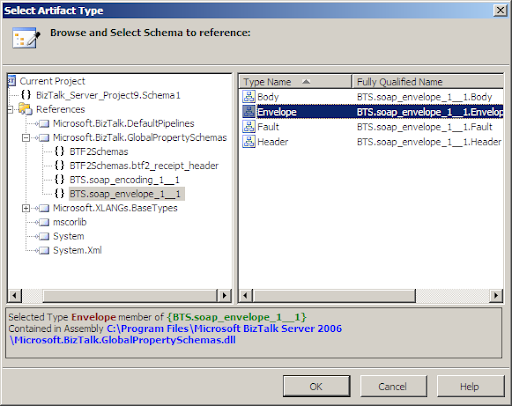
The most common scenario is when BizTalk receives SOAP Envelop. It's little known that Microsoft supplies soap envelope XSD schema as part of BizTalk system schemas. The schema name is BTS.soap_envelope_1__1 and is deployed inside Microsoft.BizTalk.GlobalPropertySchemas.dll under BizTalk.System BTS application.

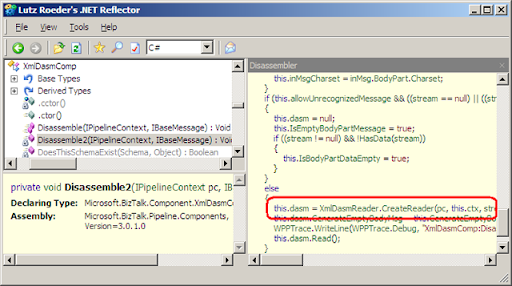
When schema is marked as Envelope (is_envelope="yes"), the engine is looking for the body_xpath annotation. This value is the actual data section and will be assigned as the message part. The value of body_xpath attribute is saved in dbo.bt_DocumentSpec table of BizTalkMgmtDb database. In the disassembling process the engine is extracting the value by using IDocumentSpec.GetBodyPath() under Microsoft.BizTalk.Component.Interop namespace.
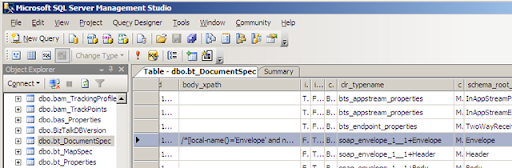
Then the engine performing denormalize process by extracting message data from the body element. At the end of the process, BTS.MessageType context property is set to the message type of actual content of the soap:Body section.
How do I start an Orchestration with soap:envelope message type

Normally, Orchestration subscription includes value for BTS.MessageType context property, this mean you can't start orchestration with the soap envelope message type because the XmlDisassembler Component will discard the soap:Envelope content and the messaging engine will only get the soap:Body content – so at the end of the process, BTS.MessageType context property will be set to the actual message type of content under soap:Body section and the orchestration will never start with the type soap:Envelope.

In case you need to process the entire soap:Envelope inside orchestration:

  • Use PassThruReceive pipeline.
  • Define message of type BTS.soap_envelope_1__1 message inside the orchestration (Message Type > schemas > from referenced assembly > Microsoft.BizTalk.GlobalPropertySchemas).
  • Use Xml Document as the incoming message.
  • Assign the incoming Xml Document message to the BTS.soap_envelope_1__1 message.
Which custom pipeline component I need to develop for extracting the soap:Body section

If you need to receive message that is wrapped by a soap envelope and you're using the XmlDisassembler pipeline component - there's no need to develop further components for extracting the body element because the engine will automatically dispatch the soap:Body as the message part.

What about soap:Header and soap:Fault section

The automatic dispatch is only for the soap:Body section and the other section are discarded. so if you also need to process the soap:Header section you have to write a custom pipeline component for this task.
Sunday, May 18, 2008

xsl:for-each statement with BizTalk mapper

Honestly, I'm not a big fan of the XSL mapper editor shipped with BizTalk extensions for VS2005. likewise with the xsl and C# functions visual representation called functoids. Personally, I find writing the XSL code to transform between one XML to another as easy approach and more easy tuning then fighting with the editor until it generates the appropriate code.

One common scenario is generating xsl:for-each loop in the XSL stylesheet. I stopped counting the times people asked me how to to obtain this with the mapper. The task is easy when you write the xsl code by yourself but much more complicated when you're trying to generate it with the mapper.

  • unbounded element to another unbounded element.

The basic scenario is transforming from one repeating element to another. consider the following:

Source Schema:


Destination Schema:

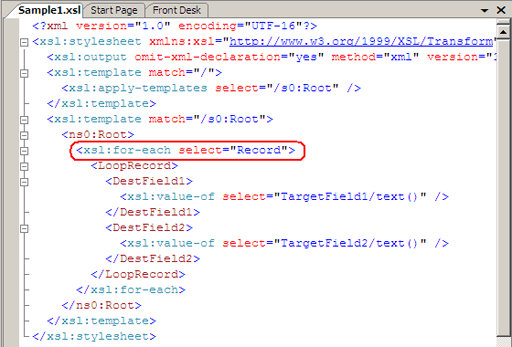
XSL Code:

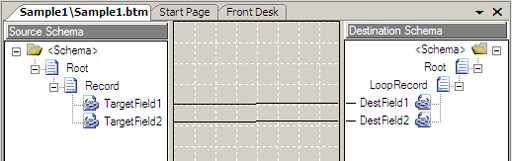
BizTalk Mapper:

As you can see, to create the above XSL, all you have to do is to drug the source elements to the destination. this is because both source and destination elements are unbounded, so the mapper 'understand' and generating xsl:for-each statement.

  • Unbounded element with maxOccurs="1" child and unbounded child:

consider the following:

Source Schema:

Destination Schema:

Input XML:

<ns0:Root xmlns:ns0="http://Pinhas_Kolsky.Demos.Mapping.Looping.Schema1">

  <Record1>

    <Record>

      <Record2>

        <TargetField1>1</TargetField1>

        <TargetField1>2</TargetField1>

      </Record2>

      <Record2>

        <TargetField1>3</TargetField1>

        <TargetField1>4</TargetField1>

      </Record2>

    </Record>

  </Record1>

  <Record1>

    <Record>

      <Record2>

        <TargetField1>5</TargetField1>

        <TargetField1>6</TargetField1>

      </Record2>

    </Record>

  </Record1>

</ns0:Root>

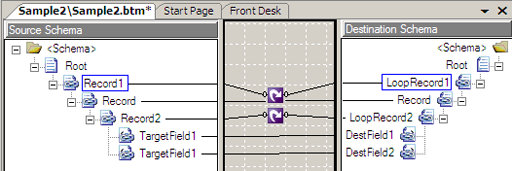
in this case, you cannot drug the elements like in the basic scenario:

BizTalk Mapper:


BizTalk mapper can 'guess' how to build the for-each statement only in the basic scenario, in the case above, the mapper will generate the first child of the unbounded destination element more then once:

XSL Code:

Output XML (Not valid):

<ns0:Root xmlns:ns0="http://Pinhas_Kolsky.Demos.Mapping.Looping.Schema2">

  <LoopRecord1>

    <Record>

      <LoopRecord2>

        <DestField1>1</DestField1>

        <DestField2>2</DestField2>

      </LoopRecord2>

      <LoopRecord2>

        <DestField1>3</DestField1>

        <DestField2>4</DestField2>

      </LoopRecord2>

    </Record>

    <Record>

      <LoopRecord2>

        <DestField1>5</DestField1>

        <DestField2>6</DestField2>

      </LoopRecord2>

    </Record>

  </LoopRecord1>

</ns0:Root>

As you can see, the element 'Record' was created twice.

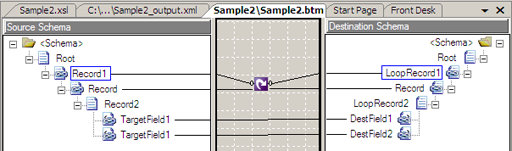
In this case you must use the looping functiod:

BizTalk Mapper:

XSL Code:

Output XML (valid):

<ns0:Root xmlns:ns0="http://Pinhas_Kolsky.Demos.Mapping.Looping.Schema2">

  <LoopRecord1>

    <Record>

      <LoopRecord2>

        <DestField1>1</DestField1>

        <DestField2>2</DestField2>

      </LoopRecord2>

      <LoopRecord2>

        <DestField1>3</DestField1>

        <DestField2>4</DestField2>

      </LoopRecord2>

    </Record>

  </LoopRecord1>

  <LoopRecord1>

    <Record>

      <LoopRecord2>

        <DestField1>5</DestField1>

        <DestField2>6</DestField2>

      </LoopRecord2>

    </Record>

  </LoopRecord1>

</ns0:Root>

It's impotent to notice that when the mapper is not automatically creates the XSL by drugging the elements, you can't use both - looping functiod for the parent and drugging unbounded to unbounded. this will generate only the first xsl:for-each. you can see this in the following:

BizTalk Mapper:


XSL Code:

Output XML (Not valid):

<ns0:Root xmlns:ns0="http://Pinhas_Kolsky.Demos.Mapping.Looping.Schema2">

  <LoopRecord1>

    <Record>

      <LoopRecord2>

        <DestField1>1</DestField1>

        <DestField2>2</DestField2>

      </LoopRecord2>

    </Record>

  </LoopRecord1>

  <LoopRecord1>

    <Record>

      <LoopRecord2>

        <DestField1>5</DestField1>

        <DestField2>6</DestField2>

      </LoopRecord2>

    </Record>

  </LoopRecord1>

</ns0:Root>

Conclusions: generating xsl:for-each statement with BizTalk mapper:

  • In a simple scenario you can generate xsl:for-each by drugging the source unbounded element to the destination unbounded element.
  • When you need to add more logic to the code (like creating maxOccurs="1" element inside the looping) you must use looping functoid.
  • In a case when a looping functoid is necessary, you must use one looping functoid for each unbounded element.  

Thursday, May 1, 2008

BizTalk project namespace and schema-type namespace duplication issue

When adding web reference to a C# project in Visual Studio, VS generates a class named Reference.cs. this class is the C# code of the XSD types of the web service. BizTalk installation includes extensions to visual studio that additionally creates classes for BizTalk artifacts that will be used by the BizTalk messaging engine.

When you create XSD schema - VS will generate cs file with the schema as a CLR object. the naming convention for this file is <schemaName>.xsd.cs 

When you add a Web reference to the project - VS will create three classes:

  1. Reference.map.cs
  2. Reference.odx.cs
  3. Reference.xsd.cs

In a future post I'll write about those classes in great details.

The namespace and the CLR class name of the auto-generated classes is depends on some factors:

For web reference:

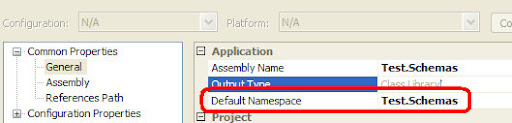
  • The class namespace is the project default namespace (by default it's Visual Studio Project filename ) + dot sign (.) +  the name of the web reference.
  • The class name is a factor of the WSDL artifact.

For XSD schema:

  • The class namespace is the schema-type namespace
  • The class name is the schema-type name.

This naming convention is auto-generated and you can't control or change it.

Another thing to know is that for the Compiler perspective, the default namespace for all artifacts in the project is default namespace (by default it's the VS project filename).

All the above leads us to this:

What if the default namespace (the project filename) is equals to the XSD schema-type namespace?

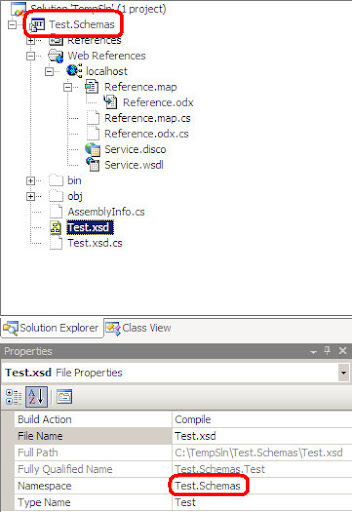
In a regular situation it's all right but in case you adding web reference to the project, VS will generate the namespace for the Reference.odx.cs classes in the form of <ProjName>.<WebRefName> so if the name of the project file is Test.Schemas it will look like: Test.Schemas.<nameOfWebRef>

In the sample below Test.Schemas is a namespace.

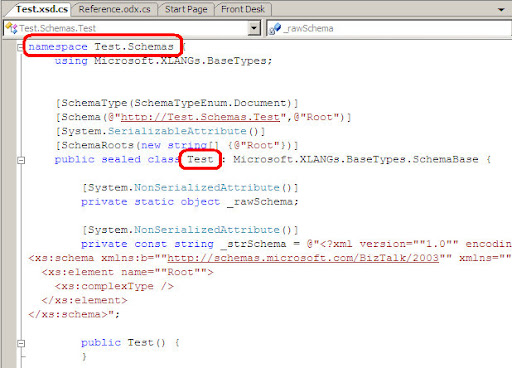
When VS generates the XSD schema class it will generate it in the form of <schemaNS>.<schemaName>

in the sample below Test.Schemas is the class namespace and Teat is the class name; explicit: Test.Schemas.Test

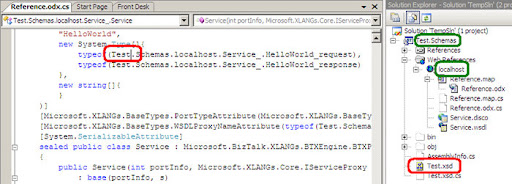
When the compiler tries to compile the project it will translate the word 'Test' in namespace of the web reference file Reference.odx.cs as the class that represents the XSD schema-type, because the schema has the same namespace as the project default namespace – by default the VS project name.


This process will cause the following error:

error CS0426: The type name '<Name>' does not exist in the type.

The error means that the XSD generated class 'Test' does not contains member with the name 'Schemas'. this is completely true because 'Test.Schemas' is only a namespace – copied from the project namespace.

To fix the error, all we have to do is to change the schema name or the schema namespace. additionally, we can change the project default-namespace and then import the web reference.

Be aware that to change the web reference namespace you need to remove them and adding them again.

The insights of all of this: if your project default namespace is composed of two words separated by a dot (.) sign:

  • Unless you have a web reference in your BizTalk project – you can name the schema namespace just like the VS project file including 'dot' sign, you can also name the schema-type name as the first word in the Project filename.
  • If you need to include a web reference in the project change the schema-type namespace to be different from the project namespace. additionally; you can name the schema-type name different from the first word in the project namespace.

 
Copyright © 2007 | Diseñado por Blog and Web