Showing posts with label Code. Show all posts

Wednesday, December 17, 2008

Managing a BizTalk 2006 MSI deployment packages

One of the features of BizTalk 2006 deployment module is the ability to export and import a BizTalk Application as MSI installation package.

In this way we can treat each application as an atomic deployment package. This means that if we need to update our application resources with a new version, we can create a new MSI version 2.0 with all new versions of the resources and then deploy them all in one managed package.

The creation of the MSI package can be done from within the Administration Console MMC or through BTSTask.exe script.


or with BTSTask.exe:

ExportApp -ApplicationName:MyApp -Package:"C:\Temp\MyApp.Msi"

To see BTSTask.exe usage:

C:\Program Files\Microsoft BizTalk Server 2006>BTSTask.exe ExportApp -?

All BizTalk Exported MSI files are always versioned ‘1.0.0.0’

Both BizTalk Administration console and BTSTask.exe sharing the same API to create this MSI file. The methods and classes to administrate BizTalk reside under Microsoft.BizTalk.ApplicationDeployment.Application namespace of assembly Microsoft.BizTalk.ApplicationDeployment.Engine.

The method that actually creates the MSI package is

CreateMsiPackage(string msiPath, ICollection<Resource> resources, ICollection<string> applicationReferences, IDictionary<string, object> requestProperties)

Now, unfortunately by using this method, BizTalk always creates the MSI file version as 1.0.0.0 – this means that we can’t easily manage our MSI installation packages because even if we're creating MSI of version 2.0, BizTalk will export it as 1.0  

This restriction is for some reason hard-coded and you just can't change it.

in the following figure you can see the hard-coded msi version:


How can I change the MSI version and successfully manage my installation packages

One of the ways I’ve seen people handling this restriction is by simply name the generated  MSI installation Package with some Naming-Conventions like <ApplicationName>_<VerNum>.MSI

I consider a file name as a poor way to ensure version identity, a better idea is to somehow "Patch" the MSI metadata itself to hold the correct version. in this way, I can assure that no one will accidently rename my MSI file (just think on how easy that can happen).

What is BizTalk MSI installation package

Before I'll show you how to patch the file, it's first must be understood that an MSI file is actually a Database file. Inside the MSI there's some system table that contains a lot of data like parameters of the MSI, the name of the CAB files, the Binary stream data content of the CAB files, custom actions etc.

The MSI Installer engine executes SQL queries against the MSI tables and by that installing and extracting the actual files. the functions required to work with MSI protocol can be reference through msi.dll unmanaged DLL under windows system directory.

You can find the MSI database documentation on MSDN here

Browse into BizTalk MSI

The best way to know what MSI in general (and BizTalk MSI file in particular) means is by using "Microsoft Orca".

As you can see in the figure above, the version of the MSI is saved in 'ProductVersion' cell under 'Property' table.

So, the solution to BizTalk hard-coded 1.0 version problem is to change this value inside 'Property' table. but how can we get inside the MSI tables and change this value? – one way is by using a tool like Microsoft Orca, but in this way, the developer (or administrator) must patch the file by hand and it’s a path to future mistakes. I consider it to be a good solution only if we can some-how automate the process afterwards, so some like always some C# code can do the trick.

Patching BizTalk MSI file

BizTalk ships with a helper class to manage MSI and CAB files. The assembly name is Microsoft.BizTalk.MSIManager.dll

This class is actually a managed code wrapper around the MSI.dll functions and mach more easy to code then PInvoke. BizTalk infrastructures API's for deployment uses this class to create and import files form BizTalkMgmtDb into an MSI installer file and vise versa.

So, now we understand that we can't force BizTalk to export the MSI with another version then 1.0.0.0 but we can still use BizTalk helper classes to get an easy access the MSI tables and to change the information holds inside the exported MSI.

Here's the code snippet:

        public void UpdateMSIProps(string msiPath, string version)

        {

            Database db = Installer.OpenDatabase(msiPath, DatabaseOpenMode.Transact);

            string query = @"UPDATE Property SET Property.Value = '" + version + "' WHERE Property.Property = 'ProductVersion'";

            Record rec = null;

            Microsoft.BizTalk.ApplicationDeployment.MSIManager.WindowsInstaller.View vw =

            db.OpenView(query);

            vw.Execute();

            vw.Close();


            db.Commit();

            db.Close();

            db.Dispose();

        }

I also guess you’ll probably want to automate following steps as a script:

  • BTSTask.exe -AddResource
  • BTSTask.exe -ExportApp
  • Patch MSI
  • Move MSI to the destination MSI's folder.

Conclusion

Although BizTalk can export Application from BizTalkMgmtDb into a MSI installer package, it’s also forces this package to be of version 1.0.0.0

we simply can't do much with that because it's hard-coded with BizTalk deployment API but we does can take the newly generated MSI and 'Patch' the correct table with our desired version.

In this way we can handle our MSI versioning in the correct way.

Thanks’ to Moti Feldman for helping me with this issue.
Saturday, June 21, 2008

Dependency in BizTalk Assembly

When you deploy BizTalk assembly you must ensure that any referenced assembly is also deployed. Actually, BizTalk is enforcing that by not letting you applying adding resource action without deploying all its references.

When removing resource BizTalk doesn't uninstalling the actual assembly from the GAC, so, any application would work regardless to missing registration of the assembly in BizTalk database.

On the other hand, BizTalk is forcing dependencies when trying to delete (or modify) any resource that has other depended artifact in BizTalk. This means that if one application uses pipeline component or map from referenced BizTalk Application, BizTalk explorer object model (Microsoft.BizTalk.ExplorerOM) will throw an exception when trying to remove the assembly containing the pipeline component or map as long you'll not reset the pipeline to the default passthrough pipeline components (or some pipeline from other deployed assembly) and remove the mapping from the port.

The very same behavior is happens when it come to BizTalk resources. Any attempt to remove assembly that referenced by other assembly inside any BizTalk application will throw exception by BizTalk ApplicationDeployment API's. (Microsoft.BizTalk.ApplicationDeployment)

How does BizTalk detects references assemblies

BizTalk is actually uses System.Reflection to detect references. Each System.Reflection.Assembly object has References member of type List that contains the fully-qualified name. Inside BizTalk any resource has Resource.Luid property, when deleting (or modifying) assembly ApplicationDeployment API's loads each resource as an System.Reflection.Assembly object and checks the References member for this Luid. If BizTalk finds equal Luid an exception will be thrown.

Because of this reason, updating infrastructure artifacts is quite headache. The Process must be in the following order:

  • Removing all referenced Applications.
  • Remove infrastructures old version.
  • Deploy infrastructures new version.
  • Deploy all high level referenced Application.

Where can I search for BizTalk assembly for checking its referenced Assemblies

There are three places which BizTalk assembly can be found for checking its referenced assemblies:

  • Local server where the assembly location specified by the sourceLocation property – this approach
  • Remote server where the sourceLocation property specifies assembly on the local machine - this is the most bad option because you must be sure the assembly is the very same as the one on the remote computer. Unfortunately this is the actual way BizTalk Administration Console is using – see below.
  • Local server on the GAC – this is the best option because it checks the actual running assembly.

How can I detect references in BizTalk assemblies

BizTalk 2006 MMC offers GUI for detecting references in BizTalk assemblies. Despite this, the MMC is running in a client mode, on a remote computer so, the GUI is not checking the remote machine GAC. As I wrote, this checking is Reflection based so; the BizTalk MMC must load the assembly into memory before being able to search for Luid equality – which is not possible from remote computer.

The way BizTalk MMC handles this issue is by using the property annotations list that each BizTalk resource contains:

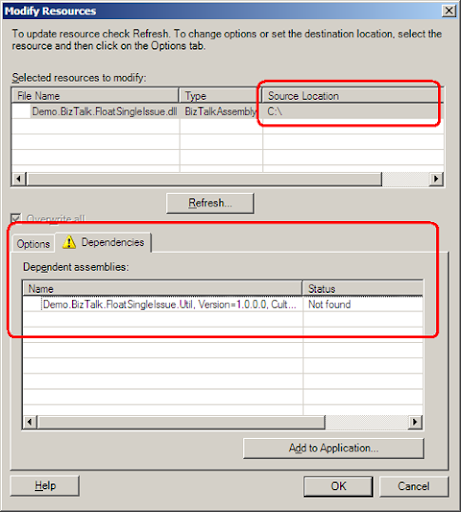
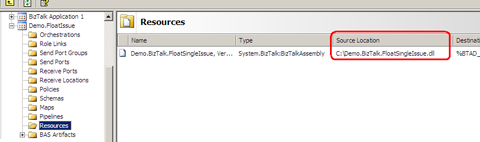
Each Resource has Resource.Properties property of IDictionary<string,Object> type. the entry in this dictionary which points to the resource path is 'SourceLocation' so, BizTalk Administration console uses this entity for the parameters needed by System.Reflection.Assembly.Load method. By this, if the local machine contains the assembly on the same path as in the remote computer – BizTalk Administration console can load it into memory and search for references.


In the following, BizTalk administration console MMC was find the assembly in the path specified under the sourceLocation, so check for dependencies was preformed.


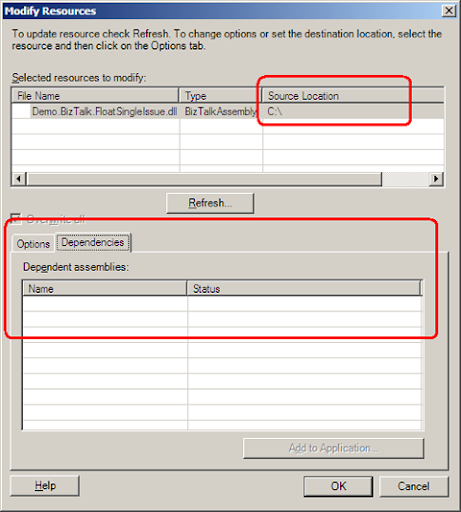
If the Administration Console can't find the assembly in the location specified in sourceLocation – the System.Reflection.Assembly.Load method failed and no further check is preformed.

In this insight, it would be much more advisable to run the check on the local server GAC. Unfortunately, BizTalk 2006 administration console is MMC snap-in and was designed to run on a remote computer so it does not support this approach.

The first step for extracting BizTalk Assembly from the GAC is by finding the path to the assmebly. this can be done by using the  GetAssemblyPath(string assemblyDisplayName) static method of the GAC class under Microsoft.BizTalk.Gac namespace. you can find this namespace in Microsoft.BizTalk.Deployment.dll

The second step is to load the assembly. this can be done by using Microsoft.BizTalk.Deployment.Assembly namespace. use AssemblyBase property of the BtsAssemblyManager class.

Here's the code snippet:

public List<string> CheckDependencies(string btsAssemblyLuid, string btsSqlServerName)
{
   List<string> dependeciesArr = new List<string>();
 
   string[] btsAssemblyProps = btsAssemblyLuid.Split(',');
   string btsAssemblyName = btsAssemblyProps[0];
   string btsAssemblyVersion = btsAssemblyProps[1].Remove(1, "Version=".Length).Trim();
   string btsAssemblyCulture = btsAssemblyProps[2].Remove(1, "Culture=".Length).Trim();
   string btsAssemblyKey = btsAssemblyProps[3].Remove(1, "PublicKeyToken=".Length).Trim();
 
  string btsAssemblyPath = Microsoft.BizTalk.Gac.Gac.GetAssemblyPath(btsAssemblyName);
  Microsoft.BizTalk.Deployment.Assembly.BtsAssemblyManager mgr = new Microsoft.BizTalk.Deployment.Assembly.BtsAssemblyManager(btsAssemblyPath, null);
 
  Microsoft.BizTalk.MetaDataOM.IAssemblyBase assembly = mgr.AssemblyBase;
 
   Microsoft.BizTalk.ApplicationDeployment.Group group = new Microsoft.BizTalk.ApplicationDeployment.Group();
   group.DBName = "BizTalkMgmtDb";
   group.DBServer = btsSqlServerName;
 
   foreach (Microsoft.BizTalk.ApplicationDeployment.Application app in group.Applications)
   {
       foreach (Microsoft.BizTalk.ApplicationDeployment.Resource res in app.ResourceCollection)
       {
           if (res.ResourceType.Equals("System.BizTalk:BizTalkAssembly") || res.ResourceType.Equals("System.BizTalk:Assembly"))
           {
               string[] props = res.Luid.Split(',');
               string name = props[0];
               string version = props[1].Remove(1, "Version=".Length).Trim();
               string culture = props[2].Remove(1, "Culture=".Length).Trim();
               string key = props[3].Remove(1, "PublicKeyToken=".Length).Trim();
 
               string path = Microsoft.BizTalk.Gac.Gac.GetAssemblyPath(name);
               Microsoft.BizTalk.Deployment.Assembly.BtsAssemblyManager manager = new Microsoft.BizTalk.Deployment.Assembly.BtsAssemblyManager(path, null);
               Array references = manager.AssemblyBase.References as Array;
 
               foreach (string refName in references)
               {
                   if (assembly.DisplayName.Equals(refName))
                   {
                       dependeciesArr.Add(app.Name + " : " + res.Luid);
                   }
               }
           }
       }
   }
 
   return dependeciesArr;
}


Copyright © 2007 | Diseñado por Blog and Web