Showing posts with label Context Property. Show all posts

Tuesday, August 26, 2008

Unexpected disappearance of messages after executing BizTalk pipeline component

Here's another 'mysteries' behavior in BizTalk pipeline components:

If you're promoting a context property that only was 'GAC'd but haven't successfully deployed into BizTalkMgmtDb (by adding the BizTalkAssembly as a resource in BizTalk management console), at runtime the pipeline component will search the context schema generated class (see here) in the machine GAC and will promote the value as expected, BUT at the end of the Execute (IPipelineContext pContext, IBaseMessage pInMsg) method, BizTalk will 'freeze' like no message was submitted into the message-box by the pipeline. also there's no error messages in the event viewer. this is happens even if the promoted property is not used as the subscriber parameter.

It's not surprising that for a well working context property you must first deploy the property schema. the strange thing here is one, the way BizTalk pipeline components promoting values which is without any validation inside BizTalkMgmtDb schema tables. second, the unexpected disappearance of the message without any clue in the event viewer.

I guess this is one of the problems with the two management repositories of BizTalk artifacts: GAC and BizTalkMgmtDb database. for example: when you're looking for a IDocumentSpec object using GetDocumentSpecByName method - BizTalk will fetch the schema by executing a query against the database. but when working with a context property, in the pipeline perspective, even if it uses the previously generated schema class to get the name and namespace, the purpose is to add the value into the context property list with IBaseMessageContext.Promote method, so the pipeline is not looking inside the database to actually validate the context property existence and the pipeline assumes the developer is knowing what he is doing (yeah, right...). the problem is that afterwards, the pipeline is submits the message into the message box and then the routing engine is looking for a subscriber by executing T-SQL stored-procedure against the database, so you must have the context property inside the database tables.

Maybe in the next version we'll not have to manage artifacts in two places - till then, just be aware to deploy all the property schemas before running any pipeline component that uses them.
Monday, January 21, 2008

BizTalk Context Property Class Generator - BTSPscGen.exe

When working with BizTalk Pipeline components, it’s a common requirement to work with context property values.

The context property key is actually XML element defined in the Property Schema, and is a combination of the name and namespace of the XML element.

To read a context property value, you use the Read method on the context object of IBaseMessage:

object Read(string strName, string strNamespace);


Now, because its so easy to make mistakes with the name and namespace (just like all other string value in your code) its very advisable to save those values as constants. Something like that:

const string EPMRRCORRELATIONTOKEN_NAME = "EpmRRCorrelationToken";

const string EPMRRCORRELATIONTOKEN_NAMESPACE = "http://schemas.microsoft.com/BizTalk/2003/system-properties";


public IBaseMessage Execute(IPipelineContext context, IBaseMessage inMsg)

{

object epmObj = inMsg.Context.Read(EPMRRCORRELATIONTOKEN_NAME, EPMRRCORRELATIONTOKEN_NAMESPACE)


if (epm != null)

{

//Do Something here

}

return outMsg;

}


More elegant way is to use the classes in Microsoft.BizTalk.GlobalPropertySchemas.dll


public IBaseMessage Execute(IPipelineContext context, IBaseMessage inMsg)

{

BTS.EpmRRCorrelationToken epm = new BTS.EpmRRCorrelationToken();

object epmObj = inMsg.Context.Read(epm.Name.Name, epm.Name.Namespace);

if (epm != null)

{

//Do Something here

}

}


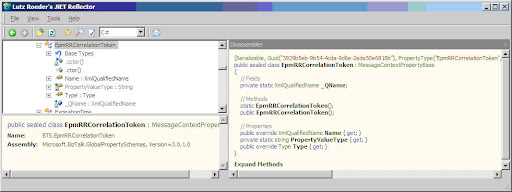
You can see the benefits of the second approach with Reflector:

Property schema element class


  • The class has Type property that is the CLR object type of the context property value.
  • System.Xml.XmlQualifiedName object (that have some useful method itself) include the name and namespace values.

To me it's seemes that the above is the most appropriate way, so, if you want to create your own GlobalPropertySchemas.dll follow thoes steps:

  1. Create a new BizTalk project
  2. Create a folder with the appropriate Name (ex. ESB)
  3. Add a new property schema (ex. ESBProperties)
  4. Add the context-properties (ex. ServiceName).
  5. complie

the results are generated classes for each context-property (ex. ESB.ServiceName)

For educational proposes, I once wrote a utility that takes a user defined BizTalk schema property and generates this class for every element so you could see what happens behind scene. also, you can extend this tool and create more "smart" classes for your own GlobalPropertySchemas.dll

So, go ahead and start using your own GlobalPropertySchemas.dll in the very same way that BizTalk artifacts are using property schema elements from inside code.

BTSPscGen.exe source-code can be download form: http://pinhask.googlepages.com/BTSProperySchemaClassGen_Source.rar

Enjoy!.

 
Copyright © 2007 | Diseñado por Blog and Web