Showing posts with label Pipeline. Show all posts

Tuesday, August 26, 2008

Unexpected disappearance of messages after executing BizTalk pipeline component

Here's another 'mysteries' behavior in BizTalk pipeline components:

If you're promoting a context property that only was 'GAC'd but haven't successfully deployed into BizTalkMgmtDb (by adding the BizTalkAssembly as a resource in BizTalk management console), at runtime the pipeline component will search the context schema generated class (see here) in the machine GAC and will promote the value as expected, BUT at the end of the Execute (IPipelineContext pContext, IBaseMessage pInMsg) method, BizTalk will 'freeze' like no message was submitted into the message-box by the pipeline. also there's no error messages in the event viewer. this is happens even if the promoted property is not used as the subscriber parameter.

It's not surprising that for a well working context property you must first deploy the property schema. the strange thing here is one, the way BizTalk pipeline components promoting values which is without any validation inside BizTalkMgmtDb schema tables. second, the unexpected disappearance of the message without any clue in the event viewer.

I guess this is one of the problems with the two management repositories of BizTalk artifacts: GAC and BizTalkMgmtDb database. for example: when you're looking for a IDocumentSpec object using GetDocumentSpecByName method - BizTalk will fetch the schema by executing a query against the database. but when working with a context property, in the pipeline perspective, even if it uses the previously generated schema class to get the name and namespace, the purpose is to add the value into the context property list with IBaseMessageContext.Promote method, so the pipeline is not looking inside the database to actually validate the context property existence and the pipeline assumes the developer is knowing what he is doing (yeah, right...). the problem is that afterwards, the pipeline is submits the message into the message box and then the routing engine is looking for a subscriber by executing T-SQL stored-procedure against the database, so you must have the context property inside the database tables.

Maybe in the next version we'll not have to manage artifacts in two places - till then, just be aware to deploy all the property schemas before running any pipeline component that uses them.
Monday, March 10, 2008

Microsoft.BizTalk.ParsingEngine.FFReader ReadToFollowing Issue

Have you ever worked with Microsoft.BizTalk.ParsingEngine.FFReader object to parse Flat-File contant in Pipeline component? be aware not to use ReadToFollowing() method within this object.

I've wrote a custom PPLC to parse and modify Flat File. Hers the Code snippet:

//Get the messge stream

Stream inStream = inMsg.BodyPart.GetOriginalDataStream();


//Get FFDocumentSpec and parse content from FF to XML with FF Anotation

IFFDocumentSpec docSpec = (IFFDocumentSpec)context.GetDocumentSpecByName("MyPoject.Schemas.MySchema_FF");


//Prepare Stream reader

StreamReader streamReader = new StreamReader(inStream);


Microsoft.BizTalk.ParsingEngine.DataReader dataReader = new Microsoft.BizTalk.ParsingEngine.DataReader(streamReader);


//start parsing the message

reader = (Microsoft.BizTalk.ParsingEngine.FFReader)docSpec.Parse(dataReader);


//start reading the message

reader.ReadToFollowing("nodeName", "http://node.Namespace");

The FFReader class is derived from System.Xml.XmlReader I read the content of the stream with the System.Xml.XmlReader.ReadToFollowing(String) method. and was very surprised to run into some NullReferenceException runtime exception. The Exception was thrown at ReadToFollowing() method.

After checking all the member initialization, I decided to search a little deeper inside the framework.

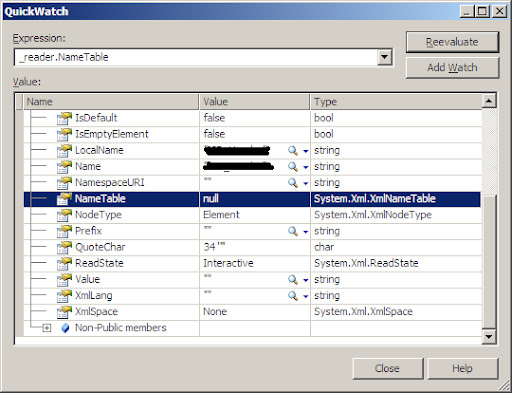
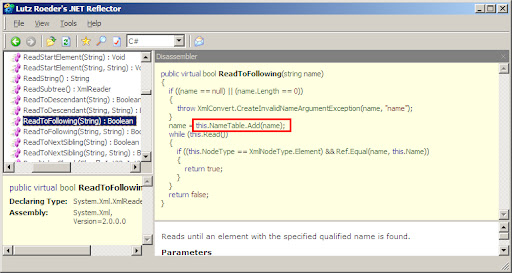
I find out that FFReader doesn't implements it's own ReadToFollowing() method so, the method is executing as in the base XmlReader Class.

The FFReader doesn't initializing the 'TableName' object and this member is remaining Null.

Unfortunatlly, the base XmlReader uses this object in the ReadToFollowing() method so it was cousing NullReferenceException.

Conclusion: manually create your own ReadToFollowing() method and don't use the one under FFReader.

public bool ReadToFollowing(string localName, string namespaceURI, FFReader reader)

{

while (reader.Read())

{

if (reader.Name.Equals(localName) && reader.NamespaceURI.Equals(namespaceURI))

return true;

}

return false;

}


Copyright © 2007 | Diseñado por Blog and Web