Monday, March 31, 2008

70-235 Exam: Developing Business Process and Integration Solutions Using Microsoft BizTalk Server

Just passed Microsoft MCTS 70-235 exam. I can tell you that the preparations you have to take for this exam are very different from other Microsoft exam because there's almost no references from Microsoft (except MSDN).

It's seems that the team is checking the candidate knowledge about various of BTS-related technologies such as BAM and BRE, so in the single question in the exam with some code - you don't really need to know what you're coding, you need to identify the correct object to use (It's a question about invoking BRE policy).

If you're going to take the exam I can assist you with those tips:

  • Spend time on the samples that ships with BizTalk and the Walk-through scenarios - spastically the BRE and BAM stuff. - Pay attention to the order of the actions you perform in those's sample.
  • Choose the right answer even if it's seems so clear (remember that no one is trying to fool you)
  • Read the documentation in the MSDN - this way you'll know that for example "BizTalk Editor" is the way Microsoft is calling the Schema Editor in Visual-Studio 2005 BizTalk 2006 extensions.
  • Prepare yourself with BizTalk references other then Microsoft (I read "Professional BizTalk Server 2006" from Wrox).

Monday, March 24, 2008

BizTalk Host-Instances selection

Choosing the right Host-Instance for BizTalk artifact (like a send port) is one of the basics to a successful project. This is one of the points where development and test/prod environment are so different.

Scenario 1:

All BizTalk Host-Instances queues have a table under MsgBobDb with the prefix:<HostName>Q. when the adapter is committing a message into BizTalk MsgBox it means that the message was committed into this queue. afterwards a process of de-queue will be fired. just imagine what will happened if you have two services one is batch process with thousands of messages, and the second is on-line. the first process will flow the queue and the second on-line process will suffer from badly performance (and not like Message queuing like WMQ and MSMQ there's no way to configure priority within BizTalk queuing).

Scenario 2:

If I have two BizTalk Servers with one MsgBox (this usually increase performance), I need to run a Receive Location or Send Port on one of those Servers - the only way is to create separated Host Instances - one on each server and then to configure the port to be hosted within the correct Host Instance.

Scenario 3:

We need to collect files from a directory, then we need to send the content of the files to a web-service. The web-service processing is taking a long time - mach more then collecting the files from a file-system directory. the results of this is that while BizTalk is busy to commit the incoming messages into the MsgBox the Send process is waiting. also, if the incoming messages are very big - the processing is likely to use a lot of the BTSNTSvc process free memory and the sending process will wait to this memory to be freed before processing.

Scenario 4:

The Send Port must run under specific user to grand access permissions.

Monday, March 10, 2008

Microsoft.BizTalk.ParsingEngine.FFReader ReadToFollowing Issue

Have you ever worked with Microsoft.BizTalk.ParsingEngine.FFReader object to parse Flat-File contant in Pipeline component? be aware not to use ReadToFollowing() method within this object.

I've wrote a custom PPLC to parse and modify Flat File. Hers the Code snippet:

//Get the messge stream

Stream inStream = inMsg.BodyPart.GetOriginalDataStream();


//Get FFDocumentSpec and parse content from FF to XML with FF Anotation

IFFDocumentSpec docSpec = (IFFDocumentSpec)context.GetDocumentSpecByName("MyPoject.Schemas.MySchema_FF");


//Prepare Stream reader

StreamReader streamReader = new StreamReader(inStream);


Microsoft.BizTalk.ParsingEngine.DataReader dataReader = new Microsoft.BizTalk.ParsingEngine.DataReader(streamReader);


//start parsing the message

reader = (Microsoft.BizTalk.ParsingEngine.FFReader)docSpec.Parse(dataReader);


//start reading the message

reader.ReadToFollowing("nodeName", "http://node.Namespace");

The FFReader class is derived from System.Xml.XmlReader I read the content of the stream with the System.Xml.XmlReader.ReadToFollowing(String) method. and was very surprised to run into some NullReferenceException runtime exception. The Exception was thrown at ReadToFollowing() method.

After checking all the member initialization, I decided to search a little deeper inside the framework.

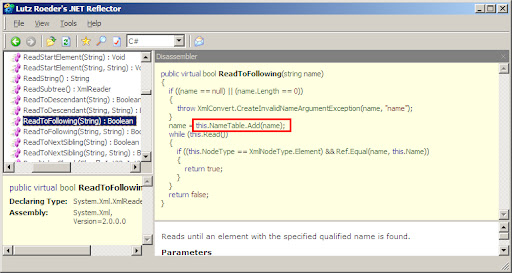
I find out that FFReader doesn't implements it's own ReadToFollowing() method so, the method is executing as in the base XmlReader Class.

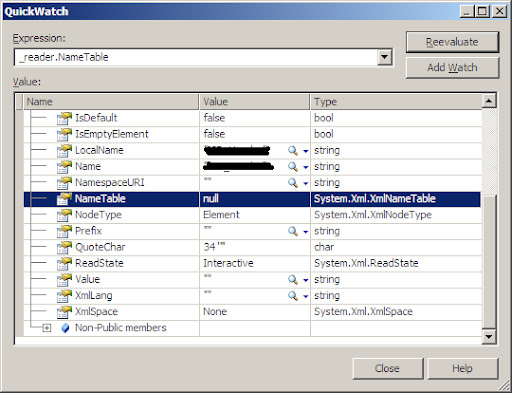
The FFReader doesn't initializing the 'TableName' object and this member is remaining Null.

Unfortunatlly, the base XmlReader uses this object in the ReadToFollowing() method so it was cousing NullReferenceException.

Conclusion: manually create your own ReadToFollowing() method and don't use the one under FFReader.

public bool ReadToFollowing(string localName, string namespaceURI, FFReader reader)

{

while (reader.Read())

{

if (reader.Name.Equals(localName) && reader.NamespaceURI.Equals(namespaceURI))

return true;

}

return false;

}


Monday, February 18, 2008

Arrays in BizTalk Orchestration - Part I

I really don’t know why but I often hear from BizTalk developers that XLANG/s does not support arrays. The truth is that arrays in BizTalk orchestration are not an issue at all. XLANG/s does fully support arrays. More than that, XLANG/s fully supports indexing within arrays.

Here's some links:

"BizTalk Server can consume one dimensional and jagged arrays exposed by Web services that are not BizTalk Web services" (Support for consuming arrays exposed by Web services) http://msdn2.microsoft.com/en-us/library/aa561724.aspx

"XLANG/s supports single-dimensional arrays, but does not support array literals" http://technet.microsoft.com/en-us/library/aa560334.aspx

How to Consume Web Service Arrays: http://msdn2.microsoft.com/en-us/library/aa559325.aspx

I suppose the reason to this mistaken is because of the following downfalls:

  1. You can’t declare typed array (like string[]) variable in the Orchestration editor.
  2. You can’t initialize typed array using 'new' keyword (arr = new string[4] is not valid)
  3. XLANG/s considers Array as primitive and not as an object. This means you can’t use useful methods and properties like Length (arr.Length is not recognized)

On the other hand, BizTalk 2006 was designed with Xml web services in mind – this means that every serializable object is accessible from inside BizTalk orchestration. If you need to consume a web service that returns array, BizTalk will serialize the web message part into the appropriate CLR object and not just into general System.Array object.

Sunday, February 17, 2008

A Great new integration blog

Alex Linder is one of the integration consultants in our company and a very good friend.
He is one of the fewest people I know with a lot knowledge and experience of many integration technologies.
In the past last years he is examining products like Microsoft BizTalk Server, WebSphere Message-Broker and WebSphere MQ to the very edge.

Now he sharing his investigations and tips in his great new blog: http://linderalex.blogspot.com/

It's a great place for all you integration experts so stay tunes – I'm sure I would!

Congratulations Alex.

Sunday, February 3, 2008

Publishing BizTalk Orchestration as WCF service

Some issue I encountered when publishing BizTalk Orchestration as WCF service.

After the wizard finished, I tried to browse to the svc file and got the following error:

Type 'System.ServiceModel.Activation.HttpHandler' cannot be instantiated under a partially trusted security policy (AllowPartiallyTrustedCallersAttribute is not present on the target assembly).

It seems that WCF can't initiate itself with less then full trust policy. To solve this edit the service web.config under <system.web> section with the following entry:

<trust level="Full">

By this you'll grand the service full trust security policy.

Another error is: Receive location for address ".svc" not found. (The BizTalk receive location may be disabled.)

This one means that the target Receive Location in BizTalk administration is not existing (you didn't check the option in the wizard) or it's not enabled.

Monday, January 21, 2008

BizTalk Context Property Class Generator - BTSPscGen.exe

When working with BizTalk Pipeline components, it’s a common requirement to work with context property values.

The context property key is actually XML element defined in the Property Schema, and is a combination of the name and namespace of the XML element.

To read a context property value, you use the Read method on the context object of IBaseMessage:

object Read(string strName, string strNamespace);


Now, because its so easy to make mistakes with the name and namespace (just like all other string value in your code) its very advisable to save those values as constants. Something like that:

const string EPMRRCORRELATIONTOKEN_NAME = "EpmRRCorrelationToken";

const string EPMRRCORRELATIONTOKEN_NAMESPACE = "http://schemas.microsoft.com/BizTalk/2003/system-properties";


public IBaseMessage Execute(IPipelineContext context, IBaseMessage inMsg)

{

object epmObj = inMsg.Context.Read(EPMRRCORRELATIONTOKEN_NAME, EPMRRCORRELATIONTOKEN_NAMESPACE)


if (epm != null)

{

//Do Something here

}

return outMsg;

}


More elegant way is to use the classes in Microsoft.BizTalk.GlobalPropertySchemas.dll


public IBaseMessage Execute(IPipelineContext context, IBaseMessage inMsg)

{

BTS.EpmRRCorrelationToken epm = new BTS.EpmRRCorrelationToken();

object epmObj = inMsg.Context.Read(epm.Name.Name, epm.Name.Namespace);

if (epm != null)

{

//Do Something here

}

}


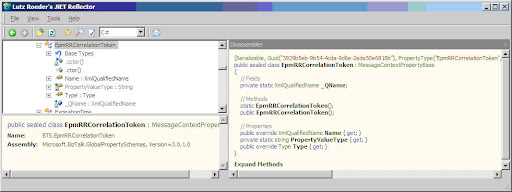
You can see the benefits of the second approach with Reflector:
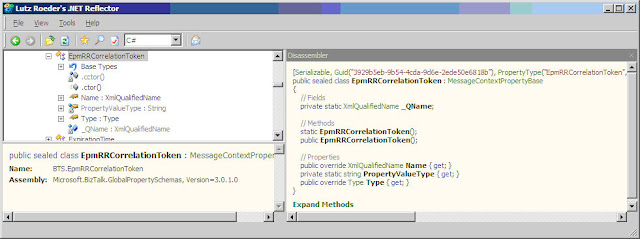
Property schema element class


  • The class has Type property that is the CLR object type of the context property value.
  • System.Xml.XmlQualifiedName object (that have some useful method itself) include the name and namespace values.

To me it's seemes that the above is the most appropriate way, so, if you want to create your own GlobalPropertySchemas.dll follow thoes steps:

  1. Create a new BizTalk project
  2. Create a folder with the appropriate Name (ex. ESB)
  3. Add a new property schema (ex. ESBProperties)
  4. Add the context-properties (ex. ServiceName).
  5. complie

the results are generated classes for each context-property (ex. ESB.ServiceName)

For educational proposes, I once wrote a utility that takes a user defined BizTalk schema property and generates this class for every element so you could see what happens behind scene. also, you can extend this tool and create more "smart" classes for your own GlobalPropertySchemas.dll

So, go ahead and start using your own GlobalPropertySchemas.dll in the very same way that BizTalk artifacts are using property schema elements from inside code.

BTSPscGen.exe source-code can be download form: http://pinhask.googlepages.com/BTSProperySchemaClassGen_Source.rar

Enjoy!.

 
Copyright © 2007 | Diseñado por Blog and Web